Integrated payments
Payments integrated with your point of sale.
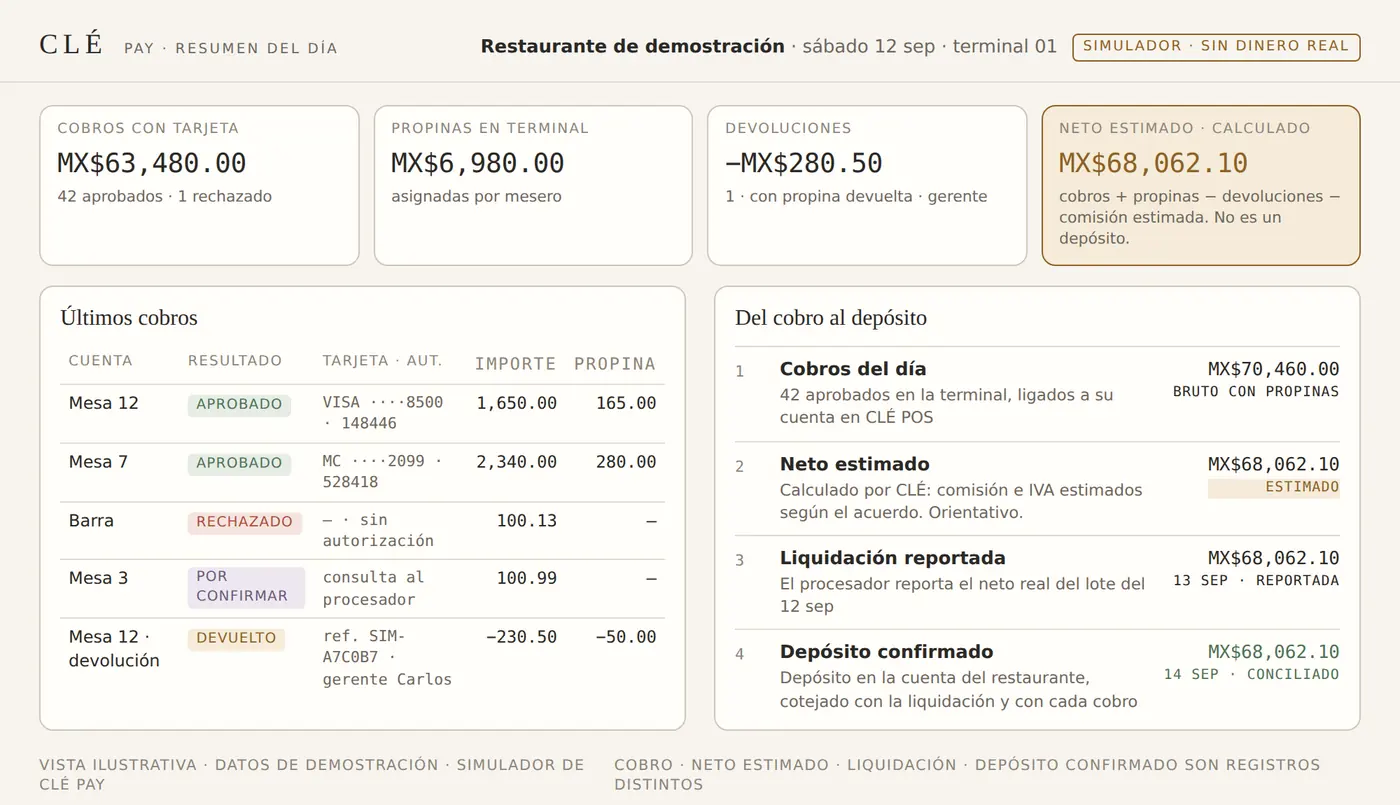
A connected experience to take payments, record tips and see your deposits. The terminal payment starts from the CLÉ POS check, and every bank deposit is matched to the payments it settles.
Benefits
- Payment tied to the checkThe payment starts from the check in CLÉ POS and its result returns to that same check, with nothing re-entered.
- Tip recordedThe tip captured on the terminal is assigned to the server and to the check.
- Deposits explainedEach confirmed deposit is matched to the processor’s settlement and to the payments it settles, with dates and fees; differences are shown.
Essential features
- Integrated terminal, by processorWhere the processor supports it, the amount comes from the check and is not typed on the terminal. Supported terminals and payment modes are confirmed through each processor’s official integration.
- Partial payments and refundsSplit payments and partial or full refunds, with refunded tip and manager authorization, recorded on the same check and in the day’s close.
- Pending payments visibleA payment without a response from the terminal is shown as pending until it is confirmed.
- ReconciliationPayment, reported settlement and confirmed deposit are matched by date and batch; an estimated net is kept distinct from a deposit.
- Operations viewPayments, pending items and reconciliation in one view for the administrator.
Example · From the check to the deposit
Payment at the table, result on the check and deposit explained. Example generated with the CLÉ Pay simulator.
- 1CheckTable 12 · CLÉ POSMX$1,650.00
- 2PaymentCard · approved · tip on terminalMX$1,650.00 + MX$165.00
- 3SettlementThe processor reports the net of the payment: fee and VAT deductedMX$1,764.21 · reported net
- 4Deposit confirmedSep 12 deposit in the restaurant’s bank account, matched to the settlement and the paymentMX$1,764.21 · reconciled
Illustrative example: the fee and the deposit timing depend on each restaurant’s processing agreement. Payment, reported settlement and confirmed deposit are separate records; reconciled means all three match. · Demonstration with simulator
Questions before you buy
- What do I need to start?
- CLÉ POS in operation and a compatible terminal, announced at activation. CLÉ Pay is activated per restaurant.
- What equipment is compatible?
- Compatible terminals are confirmed with the official payment-processor integration. Your current terminal keeps working separately.
- What can I keep from my current system?
- Your bank account, where deposits arrive, and your current terminal while you decide.
- What setup and support exist?
- Activation per restaurant guided by the CLÉ team, alongside your current way of taking payments.
- What does the subscription include, and what is billed separately?
- CLÉ Pay is the payments add-on for CLÉ POS: it charges a percentage per terminal transaction under the agreement with the processor. Full terms are disclosed before activation; see Pricing.
- What is available and what is the next step?
- In technical preparation: payments from CLÉ POS, tips, refunds, pending payments, reconciliation and the operations view run with the CLÉ simulator. Official validation with the payment processor is the next stage: it starts with the team’s technical registration and ends with certification. Next step: register your interest with the team.
Next step
Register your interest.
Planned launch · January 2027, solution by solution.
Acquirers and payment processors: we are looking to integrate terminals and settlements with CLÉ Pay for restaurants in Mexico. Institutional contact: payments@somoscle.com